Key Takeaways:
- Mojo line settings control how many lines you dial at once, how your audio is routed, and how the system handles timing, and each of those directly shapes call quality.
- Most “bad audio” complaints trace back to network conditions or hardware rather than the dialer itself, so diagnose your connection before changing anything in the platform.
- Match your line count to your connection strength and your list quality instead of defaulting to the highest setting available.
- Wired Ethernet, a dedicated business-grade headset, and a closed browser tab cleanup solve a large share of choppy-audio problems on their own.
- Poor list hygiene pushes agents toward aggressive multi-line dialing, which is where dead air, dropped hellos, and abandoned calls usually begin.
- Test one variable at a time across a fixed number of dials so you can prove which line setting change actually improved connection rate and talk time.
You dial, the prospect picks up, and then nothing happens for two full seconds. They say “hello?” a second time and hang up before you get a word out. Or the audio arrives clipped and metallic, and a homeowner who might have listed with you decides you sound like a robocall.
Those problems rarely mean the platform is broken. They usually mean your Mojo line settings are mismatched to your internet connection, your hardware, or the quality of the list you are calling. Line settings sit at the intersection of technology and conversation, and small misconfigurations cost you contacts every single session.
This guide walks through what Mojo line settings actually control, why call quality degrades, how to choose between single, double, and triple line dialing, and how to test your changes so you know they worked. If you are still getting oriented, start with what Mojo Dialer is and how it works and then come back here to tune performance.

What Are Mojo Line Settings and Why Do They Affect Call Quality?
Mojo line settings are the configuration options that determine how the dialer places calls, how many simultaneous lines it opens, how your voice travels between your computer or phone and the prospect, and how the system handles timing around answers and voicemails.
Those settings matter because a dialer is not a single system. It is a chain: your microphone, your computer, your local network, your internet service provider, the routing path, the platform, the carrier network, and finally the prospect’s handset. Call quality reflects the weakest link in that chain, and your line settings decide how much load you place on it.
Here is how specific settings map to specific symptoms:
- Line count too high for your bandwidth produces choppy audio, robotic voices, and dropped connections.
- Wrong audio input or output device selected produces echo, one-way audio, or a microphone that captures room noise instead of your voice.
- Aggressive timing or answer-detection settings produce dead air at the start of calls and higher hang-up rates.
- Voicemail detection configured poorly produces drops that land mid-greeting or messages that get cut off.
- The connection method mismatched to your environment produces inconsistent quality that seems random but actually follows your network conditions.
Once you can name the symptom, you can find the setting. Guessing is what keeps agents cycling through the same problems week after week.
How Does Mojo Handle Your Connection Before a Call Starts?
Before a single number dials, the platform has to establish how your audio will travel. Broadly, you are choosing between routing your voice over the internet from your computer or bridging the session through a separate phone line that the platform calls to connect you.
Internet-based routing gives you the cleanest integration, faster call control, and tighter reporting. It also makes you fully dependent on your connection quality. Bridging through a mobile or landline number insulates your audio from your Wi-Fi, which helps agents in offices with unreliable internet, but it introduces a second point of failure and can add a small delay to call transitions.
Neither option is universally better. Agents on fiber or reliable cable with a wired connection generally get the best experience from internet-based routing. Agents working from a co-working space, a hotel, or a location with contested bandwidth often get steadier results bridging through a phone line. Test both in your actual working environment for a full session each before deciding.
Your foundational account and campaign configuration determines how many of these options are even available to you, so get that layer right first. Our Mojo Power Dialer Setup: The Complete Guide for Sales & Real Estate Teams covers the full build from account structure through campaign creation, and it is the right prerequisite before you start fine-tuning line behavior.
Get Your Mojo Line Settings Configured by a Specialist
If you would rather not spend three weeks testing settings while your pipeline waits, a consultant can compress that work into a single working session. Our team reviews your connection environment, hardware, campaign structure, and list hygiene together, then configures line settings suited to how your team actually works rather than a generic default. Explore our Mojo consulting services to see what a full setup and optimization engagement covers.
Bandwidth, Latency, and Jitter Explained in Plain Terms
Three network measurements explain almost every audio complaint.
Bandwidth is how much data your connection can carry. Voice calls need surprisingly little, but each additional simultaneous line adds to the requirement, and everything else on your network competes for the same capacity.
Latency is the delay between you speaking and the prospect hearing you. Low latency feels like a normal conversation. High latency creates that awkward overlap where you both start talking at once. The ITU-T G.114 recommendation on one-way transmission time is the standard reference point if you want to understand acceptable thresholds.
Jitter is an inconsistency in packet arrival. This is the actual cause of most choppy, garbled, underwater-sounding audio. A connection can have plenty of bandwidth and still deliver terrible calls if packets arrive out of rhythm.
Run a connection test that reports all three, not just download speed. A speed test alone will tell you your connection is fine while jitter quietly ruins your session.
Why is My Mojo Call Quality Poor? Eight Common Causes
Poor Mojo call quality almost always comes down to one of a short list of causes. Work through them in order before you change any platform setting:
- Wi-Fi instead of a wired connection. Wi-Fi introduces jitter that varies minute to minute. A short Ethernet cable is the single highest-impact fix available to most agents.
- Bandwidth contention. Video calls, cloud backups, streaming on a smart TV, or a family member gaming will degrade your calls even on a fast plan.
- A consumer headset or laptop microphone. Built-in mics capture keyboard noise and room echo. A wired USB headset with a noise-cancelling boom mic changes how prospects perceive you.
- Too many browser tabs and background applications. Dialing sessions are resource-intensive. A machine running at ninety percent CPU cannot process audio cleanly.
- VPN or corporate proxy routing. Routing voice traffic through a VPN adds latency and often jitter. Exclude dialing traffic or disable the VPN during sessions.
- Line count exceeds what your connection supports. This is the most common platform-side mistake, and the next section addresses it directly.
- Degraded caller ID reputation. If your number has been flagged, calls may be filtered, silenced, or labeled before the prospect ever sees them. Poor answer rates that look like a quality problem are sometimes a reputation problem.
- An outdated browser or unsupported operating system. Audio handling improves with updates, and running an old version silently costs you fidelity.
Fix the environment first. Otherwise you will be adjusting settings to compensate for a problem that lives outside the platform.
How Many Lines Should You Dial On? Choosing Between Single, Double, and Triple Line
Choose your line count based on your connection strength, your list quality, and your experience level, not on the maximum the platform allows.
Multi-line dialing works by placing several calls at once and connecting you to whoever answers first. That multiplies your contact opportunities. It also multiplies your bandwidth requirement, increases the odds of two people answering simultaneously, and creates the dead air that happens while the system hands you off.
Use these decision criteria:
- Single line suits new agents, high-value or referral lists, warm follow-up, any connection you do not fully trust, and anyone who wants maximum control over the opening seconds of a call.
- Double line is the practical middle ground for most experienced agents on solid connections. You gain meaningful efficiency without the abandon-rate exposure of the most aggressive setting.
- Triple line suits high-volume cold prospecting on large, well-scrubbed lists, run by agents who are comfortable opening instantly and working from a strong wired connection.
Compliance comfort belongs in this decision too. Higher line counts raise the chance of abandoning a call after a prospect answers, and abandonment rates are something regulators pay attention to. Review the FTC and FCC guidance that applies to your outreach and set your line count within limits you are confident defending.
For a deeper side-by-side breakdown, read our Mojo Dialer triple line vs single line comparison. If you have already decided to run the aggressive setting, follow our walkthrough on how to set up triple line power dialing in MojoSells so the configuration supports the volume rather than fighting it.
When Triple Line Hurts More Than It Helps
Triple line dialing becomes counterproductive under three conditions. First, when your list contains a high share of disconnected or wrong numbers, you burn simultaneous lines on dead ends and gain little. Second, when your connection cannot cleanly carry three concurrent sessions, every connected call sounds worse. Third, when the agent is still building confidence, the rapid-fire handoffs create fumbled openings that cost more conversations than the extra dials produce.
More dials at lower quality is not progress. Contacts that turn into conversations are what matter.
How to Configure Timing, Pause Detection, and Greeting Settings
Timing settings control what happens in the first two seconds of a connected call, and those two seconds decide whether you get a conversation.
The gap between a prospect saying hello and hearing your voice is the most damaging quality issue in dialing, because it is the moment people recognize an automated call. Reduce it by lowering your line count, ensuring your microphone is unmuted and active before the session begins, and keeping your attention on the dialer rather than a second screen.
Answer detection settings determine how the system decides a human picked up versus a voicemail greeting. Detection tuned too aggressively will treat live answers as machines and drop your voicemail on a real person. Tuned too conservatively, it will hold you on voicemail greetings and waste your time. Adjust it gradually and review actual call recordings to see which way it is erring.
Voicemail drop timing deserves separate attention. A message that starts before the beep gets clipped, and a message that starts too late feels hesitant. Our guide to voicemail drop best practices in MojoSells covers message length, timing, and scripting for higher callback rates.
Reducing the Awkward Pause That Kills Answer Rates
Practical steps that shorten the opening delay:
- Drop from triple to double line and measure whether your conversation rate improves even as raw dials fall.
- Speak first and immediately, before the prospect repeats their greeting.
- Keep your headset on and your mic live for the entire session rather than toggling between calls.
- Close every application competing for audio access, including video conferencing tools running in the background.
How Does List and Data Quality Change Your Optimal Line Settings?
List quality and line settings are connected in a way most teams overlook. When a list is full of disconnected numbers, duplicates, and bad matches, contact rates collapse. The instinct is to compensate by dialing more lines at once. That raises volume while degrading the quality of every call that does connect.
A clean list lets you dial fewer lines and still hit your contact targets, which means better audio, faster openings, and fewer abandoned calls. Data hygiene is a call quality strategy, not just a productivity one.
Practical hygiene steps before any campaign:
- Scrub against Do Not Call requirements, including the FTC National Do Not Call Registry, and honor your own internal suppression list.
- Remove duplicates across imported and platform-sourced records so you are not calling the same household repeatedly.
- Standardize phone formatting and drop obviously invalid entries before upload.
- Segment by record type, such as expired, FSBO, circle prospecting, or past client, so your line settings and script match the audience.
Our guide on how to optimize your Mojo call lists walks through the full process for maximum reach without inflating line counts.
How Do You Test and Measure Whether Your Line Settings Improved?
Test line settings the same way you would test anything else: change one variable, hold everything else constant, and compare against a documented baseline.
Follow this five-step method:
- Establish a baseline. Run a normal session with your current settings and record connection rate, average talk time, dials per contact, and abandon rate.
- Change exactly one variable. Move from triple to double line, or switch your connection method, or swap your headset. One change only.
- Run a fixed dial volume. Use the same list segment, the same time of day, and the same number of dials so the comparison is fair.
- Compare the metrics that matter. Raw dial count is the least useful number. Connection rate and average talk time tell you whether quality improved.
- Document and keep or revert. Write down what you changed and what happened. Without a record, you will re-test the same things next quarter.
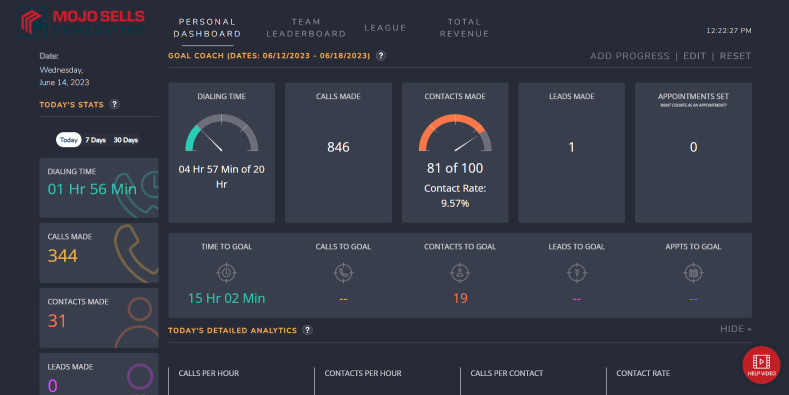
The metrics themselves matter more than the settings. Our guide on how to track and improve talk time and call ratios in Mojo explains which numbers to watch and how to read them.
A Practical Setup Checklist for Better Mojo Call Quality
Run this before every session:
- Connect via Ethernet, or move within clear range of your router if wired is impossible.
- Plug in your wired headset and confirm it is selected as both input and output device.
- Close unused browser tabs, streaming services, and background sync applications.
- Disable your VPN or exclude dialing traffic from it.
- Place a test call to your own mobile and listen to how you actually sound.
- Confirm your line count matches your connection and today’s list quality.
Run this weekly:
- Test bandwidth, latency, and jitter, not just download speed.
- Review a handful of call recordings for audio issues and mistimed voicemail drops.
- Check your outbound numbers for spam labeling using the tools your carrier provides.
- Update your browser and operating system.
- Compare this week’s connection rate and talk time against last week’s.
Consistency is what makes these checks pay off. Building them into a repeatable rhythm is easier when the rest of your day is structured, so see the perfect daily calling routine for MojoSells users for a framework that holds up over a full week.
Final Thoughts
Optimizing your Mojo line settings comes down to one principle: match your line count and connection method to the reality of your bandwidth, your hardware, and your list quality. Agents who chase maximum dial volume on a weak connection with a dirty list get worse results than agents who dial fewer lines cleanly and open every call with clear audio and no dead air.
Start with your environment. Wire your connection, upgrade your headset, close what you do not need. Then adjust one platform setting at a time and measure against a baseline you actually wrote down. Clean up your list so you are not using aggressive line settings to compensate for bad data.
If you are configuring an account or campaign from the ground up, work through the Mojo Power Dialer Setup: The Complete Guide for Sales & Real Estate Teams first. A well-built foundation makes every line setting decision downstream simpler and more effective.
Talk to the MojoSells Consulting Team About Your Call Quality
Every team’s situation is different. A solo agent on fiber has different constraints than a six-person ISA floor sharing office bandwidth. If you are unsure which line configuration fits your setup, or your call quality has degraded and you cannot identify why, contact the MojoSells Consulting team and describe what you are seeing. We will tell you where to look first.