Key Takeaways:
- Speed-to-lead dialing in Mojo means calling a new inquiry within seconds or minutes of it arriving, not hours later, and the setup work happens before the lead ever comes in.
- A dedicated “New Leads” or hot-lead list separated from your bulk prospecting lists is the single most important structural change for fast response.
- Single-line dialing usually beats triple-line for fresh inbound leads because it removes the pause and abandoned-call risk that kill conversations with someone who just raised their hand.
- Local caller ID, clean scripts, and pre-built dispositions let agents move from notification to live conversation without hunting through menus.
- Speed-to-lead only holds up when the follow-up sequence behind it is defined, so pair fast first dials with a structured multi-touch cadence in Mojo.
- Measure first-dial time, contact rate by response window, and appointment-set rate to prove whether your speed-to-lead workflow is actually working.
Most teams lose leads to timing, not talent. A homeowner fills out a valuation form, requests information on a listing, or replies to a campaign, then waits. Twenty minutes pass. An hour passes. By the time someone dials, the lead has already spoken to two other agents or moved on entirely. Setting up speed-to-lead dialing in Mojo fixes the mechanics behind that delay so your first dial happens while intent is still high.
This guide walks through the practical setup: how to structure your lists, which dialing mode fits fresh leads, how to configure caller ID and dispositions for speed, how to build the follow-up cadence that supports the first call, and which numbers to watch.
If you already run Mojo for cold prospecting, this is the layer that makes it work for inbound and warm leads too.

What Is Speed-to-Lead Dialing in Mojo?
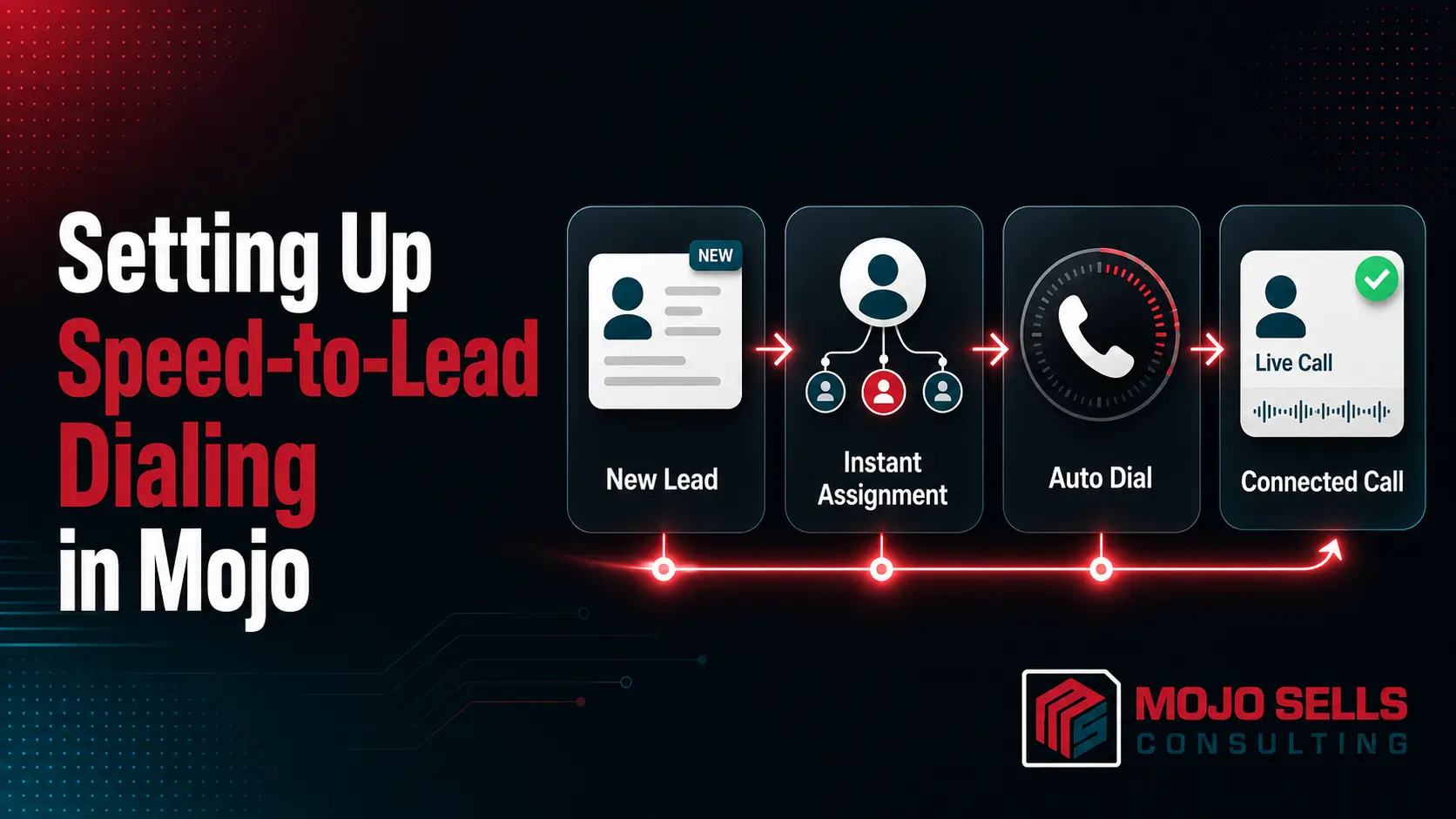
Speed-to-lead dialing in Mojo is a configured workflow where new inquiries land in a dedicated, high-priority calling list and get dialed within minutes of arrival, using dialer settings tuned for immediate live conversation rather than bulk volume.
The term “speed-to-lead” describes the gap between the moment a prospect submits their information and the moment a human being speaks to them. In practice, that gap is where most inbound conversion is won or lost. Someone who filled out a form five minutes ago remembers doing it. Someone who filled it out yesterday afternoon does not, or has already found another agent.
Mojo is built around outbound prospecting, so it does not automatically know which of your leads are brand new and which are cold records from a data pull.
That distinction is something you create through list structure, naming conventions, and disciplined workflow. Once you build it, Mojo becomes a fast-response engine rather than just a volume tool.
If you are new to the platform overall, start with the foundations in Mojo Power Dialer Setup: The Complete Guide for Sales & Real Estate Teams, then layer the speed-to-lead workflow described here on top of it.
Why Fast First Contact Changes Your Conversion Math
Speed matters because intent decays. When a prospect submits a form, they are actively in decision mode for a short window. Calling inside that window means you are answering a question they are still asking themselves. Calling later means you are interrupting them about something they have mentally closed.
Fast contact also changes the tone of the conversation. An immediate call is a service response. A next-day call is a sales call. The same agent, the same script, and the same lead will produce very different results depending on which of those two frames the prospect is in when they answer.
There is a competitive dimension as well. Most inbound real estate and sales leads are shopped, either intentionally by the prospect or unintentionally through portals and aggregators that distribute the same inquiry to multiple parties.
First voice contact often decides who owns the relationship, regardless of who has the better presentation.
Where Most Teams Actually Lose Time
The delay is rarely a dialing problem. It is usually one of these:
- New leads sit in an inbox or CRM notification that nobody monitors continuously.
- New leads get imported into the same list as thousands of cold records and never surface.
- No agent is designated as the responder during a given block of hours.
- The agent has to look up the lead, find a script, and check the property before dialing.
- Nobody knows what “fast” means because no target response time exists.
Every one of those is fixable through setup rather than effort.
How to Structure Your Mojo Lists for Speed-to-Lead
List architecture is the backbone of the entire workflow. Fresh leads need to live somewhere separate, visible, and small enough that an agent can clear it in minutes.
Build a dedicated list named something unmistakable, such as “HOT – New Leads – Call Now.” Keep it isolated from your FSBO, expired, and circle prospecting lists. The purpose of this list is not volume. It is triage. On a normal day it might hold three records, and that is exactly the point.
Set a clear rule for how leads enter it. If leads arrive by email notification, the responder imports or adds them manually the moment they appear.
If leads flow from a CRM, confirm what your integration can and cannot push into Mojo before you design around it, since dialer integrations have real limits. The realities are covered in What’s Possible and What’s Not with MojoSells CRM Integration?
Use custom fields consistently so the agent sees context before the call connects: lead source, inquiry type, property address or area of interest, and timestamp of submission. That timestamp is what lets you measure response time later.
Finally, set an exit rule. A lead should leave the hot list once it has been contacted or once it has cycled through your defined attempt sequence. A hot list that never empties stops being a hot list. For broader list hygiene principles, How to Optimize Your Mojo Call Lists for Maximum Reach and Conversions covers the segmentation and data-quality side in more depth.
H2: Choosing the Right Dialing Mode for Fresh Leads
For speed-to-lead work, single-line dialing is almost always the better choice. Multi-line dialing exists to solve a volume problem: dialing many cold numbers quickly to find the few who answer. Fresh inbound leads are the opposite situation. You have one person, they are likely to answer, and the cost of a bad connection experience is high.
Triple-line dialing introduces a small delay when the system connects an answered call to an available agent, and it can abandon calls when more than one person picks up at once. On a cold FSBO record, that is an acceptable trade.
On a lead who submitted a form four minutes ago and is waiting for a callback, a hesitation or a dropped call reads as unprofessional and burns the advantage you just earned by being fast.
Practical guidance for most teams:
- Use single-line for the hot list and any warm callback.
- Use multi-line for cold, high-volume prospecting lists.
- Never run a hot list through multi-line just because the session is already open.
The trade-offs between the two modes are broken down further in Mojo Dialer Triple Line vs Single Line – Which One Should Real Estate Agents Use? and the mechanics of the multi-line setup are covered in How to Set Up Triple Line Power Dialing in MojoSells?
Configuring Caller ID, Line Settings, and Call Quality
Being fast does not help if the call does not connect cleanly or the prospect does not recognize the number. Two configuration areas deserve attention before you launch.
Caller ID should match the market you are calling into where possible. A prospect who just submitted a form is watching their phone, and a familiar area code raises the chance they pick up. Keep your outbound numbers consistent so callbacks reach the right place, and avoid rotating numbers so aggressively that your identity becomes unrecognizable.
Audio quality is the second factor. A fast call with choppy audio produces a worse outcome than a slower call that sounds clear. Check your network connection, headset, and line configuration before high-volume blocks rather than during them. The configuration details are covered in How to Optimize Mojo Line Settings for Call Quality: A Complete Guide for Real Estate and Sales Teams
Also decide in advance what happens when the lead does not answer. A prepared voicemail message that references the specific inquiry converts far better than a generic one, and drop timing matters. Voicemail Drop Best Practices in MojoSells for Higher Callback covers how to structure those messages.
Step-by-Step: Building the Speed-to-Lead Workflow
Here is the sequence to implement, in order:
- Create the hot lead list. Name it clearly and keep it separate from all prospecting lists.
- Define your target response time. Pick a number your team can actually hold, such as five minutes during business hours and first thing the next morning for after-hours leads.
- Assign responder coverage. Block your calling day so a named person owns a new-lead response during each window. Unowned time is where delay lives.
- Set the dialing mode to single line for this list and confirm caller ID before the first session.
- Build a short inbound script. It should open by referencing the specific inquiry, confirm the request, then move to qualifying questions. This is not a cold-call opener.
- Pre-build your dispositions and tags. Contacted, appointment set, callback requested, wrong number, not interested. The agent should log the outcome in one click, not type notes from scratch.
- Define the attempt cadence. Decide how many dial attempts happen on day one, and at what intervals, before the lead moves to a longer nurture sequence.
- Connect the follow-up layer. Text and email touches should fire alongside dials, not replace them.
- Review weekly. Pull first-dial times and contact rates, then adjust coverage and cadence based on what the data shows.
Tagging and note discipline is what makes step six and step nine possible. Use MojoSells Tags and Notes to Qualify Leads Faster explains how to build a consistent taxonomy your whole team uses the same way.
Scripts, Objections, and What to Say on the First Call
A speed-to-lead call needs a different opening than a cold prospecting call. The prospect raised their hand, so your first job is to connect the call to their action, not to earn permission to talk.
Open with your name, your company, and a direct reference to what they submitted. Confirm you have the right details. Then ask an open question about what prompted the inquiry. That single question surfaces timeline, motivation, and situation faster than a list of qualifying prompts.
Expect a specific objection pattern on fast calls: surprise. Some prospects are startled that anyone called so quickly, and a few will say they were “just looking.” That is not a rejection. It is a request for lower pressure. Acknowledge it, ask one useful question, and offer a next step that costs them nothing.
For the harder pushback that follows, How to Handle Rejections and Objections on MojoSells Calls? covers response frameworks you can adapt directly to inbound conversations.
Building the Follow-Up Cadence Behind the First Dial
Fast first contact is a starting advantage, not a closing strategy. Most leads will not answer the first dial, and the teams that win are the ones with a defined cadence that runs after it.
Structure your cadence with three variables in mind: number of attempts, spacing between them, and channel mix. A workable pattern is multiple dial attempts on day one at different times of day, a text touch after the first unanswered call, an email with relevant information, then a tapering schedule across the following two weeks before the lead moves into long-term nurture.
Vary the time of day between attempts. Calling the same number at 10 a.m. five days in a row tests one hypothesis repeatedly. Spreading attempts across morning, midday, and early evening tests several.
Automating the text and email layer keeps agents on the phone instead of in an inbox. Automate Follow-Up Sequences with MojoSells and Email/SMS Tools walks through how to connect those touches without losing the personal element, and The Perfect Daily Calling Routine for MojoSells Users shows how to fit hot-lead response blocks into a full prospecting day.
Measuring Speed-to-Lead Performance and Fixing Bottlenecks
You cannot improve a response time you do not measure. Track a small set of metrics rather than a dashboard nobody reads.
- Median time to first dial. Measure from lead timestamp to first attempt. Use median, not average, since one forgotten lead will distort the mean.
- Contact rate by response window. Compare connection rates for leads dialed inside five minutes, inside an hour, and after a day. This is the number that convinces skeptical agents.
- Attempts to contact. How many dials it takes to get a live conversation tells you whether your cadence is too thin.
- Appointment-set rate by lead source. Some sources deserve faster response than others, and this shows you which.
- After-hours volume. If a meaningful share of leads arrive outside coverage, your staffing model needs adjusting, not your scripts.
When first-dial times slip, the cause is usually coverage gaps or unclear ownership rather than agent effort. Review who owned each slow-response lead and when it arrived, and the pattern will show itself quickly. Accountability structures for this kind of review are covered in Use MojoSells for Real Estate Team Accountability in 2025
For newer team members, build speed-to-lead response into onboarding from the first week rather than treating it as an advanced skill. How to Train New Real Estate Agents on MojoSells in 1 Week? offers a training structure you can adapt.
Get Your Mojo Speed-to-Lead Workflow Built Correctly the First Time
Configuring lists, dialing modes, caller ID, dispositions, and follow-up cadence takes time to get right, and small misconfigurations quietly cost conversations for months. If you would rather have the setup done and validated than experiment your way through it, the team at MojoSells Consulting works directly inside your account to build it. Explore the Mojo consulting services page to see how the engagement works and which areas of your dialer setup can be improved.
Talk Through Your Current Setup With a Mojo Specialist
Every team’s lead flow is different, and the right speed-to-lead structure depends on your sources, staffing, and market. Reach out through the contact page to discuss your current Mojo configuration and get a straightforward assessment of where your response time is leaking.
Bottom Line
Setting up speed-to-lead dialing in Mojo is a structural change, not a motivational one. You separate hot leads into their own list, dial them single-line so the connection is clean, prepare caller ID and scripts in advance, define who responds during which hours, and back the first dial with a real follow-up cadence. None of those steps are complicated on their own. Together they close the gap between a prospect’s inquiry and your first conversation.
Start with the list structure and the coverage schedule, since those two changes produce the fastest improvement. Then add the dialing configuration, the cadence, and the measurement layer. Review your first-dial times after two weeks and adjust from what you see rather than what you assume.